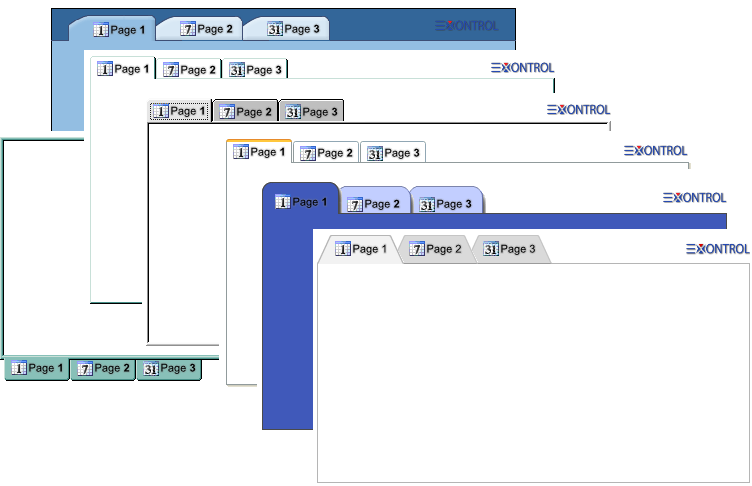
The ExTab Component is a skinnable tab control designed to organize content into multiple pages within the same area of a form or dialog, similar to notebook dividers or file cabinet labels. This allows applications to present related information or grouped controls on separate tabs, improving both clarity and user experience.
The ExTab library includes two key components:
- TabBuilder - a WYSIWYG (What You See Is What You Get) editor that allows you to easily create and customize tab skin files.
- Tab - the main tab control that supports the use of any skin files created with TabBuilder, enabling a highly customizable and visually appealing interface.
This powerful combination lets you implement modern, theme-aware tabbed interfaces with minimal effort.
Features include:
1. Appearance & Styling
- 10 predefined TAB styles
- WYSIWYG Template/Layout Editor support
- Built-in HTML support
- Hot-Colors support
- Multiple HTML lines tooltip support
- Fully customizable
2. Navigation & Interaction
- Ability to scroll pages
- Ability to show or hide tabs
- Ability to change the position for any page
3. Design & Runtime Flexibility
- Ability to insert new controls in any page at design mode as well as at runtime
Tutorials include:
The object supports the following methods and properties:
| | Name | Description | |
| | Active | Specifies the active tab number. | |
| | AttachTemplate | Attaches a script to the current object, including the events, from a string, file, a safe array of bytes. | |
| | BackColor | Retrieves or sets a value that indicates the control's background color. | |
| | Caption | Specifies the HTML caption to be displayed on the pages part of the control. | |
| | CaptionAlignment | Specifies horizontal and vertical alignment of the caption to be shown. | |
| | CContainer | Specifies the control's container. | |
| | ClientHeight | Retrieves the height of the control's client area. | |
| | ClientLeft | Retrieves the distance between left edge of the control's client area and the left border of the control. | |
| | ClientTop | Retrieves the distance between top edge of the control's client area and the top border of the control. | |
| | ClientWidth | Retrieves the width of the control's client area. | |
| | ClosePopup | Closes the floating TAB control. | |
| | CustomStyle | Returns or sets a string expression that indicates the control's custom style as a file name to a ETB file, or encoded BASE64 string of the ETB file. | |
| | Enabled | Enables or disables the control. | |
| | EventParam | Retrieves or sets a value that indicates the current's event parameter. | |
| | ExecuteTemplate | Executes a template and returns the result. | |
| | FixedPageWidth | Specifies the fixed width of the page (the control displays the pages with same size) | |
| | Font | Retrieves or sets the control's font. | |
| | ForeColor | Retrieves or sets a value that indicates the control's foreground color. | |
| | HotBackColor | Retrieves or sets a value that indicates the hot-tracking background color. | |
| | HotForeColor | Retrieves or sets a value that indicates the hot-tracking foreground color. | |
| | HotObject | Retrieves or sets a value that indicates the index within current tab-skin, that changes its background while the cursor hovers the page. | |
| | HTMLPicture | Adds or replaces a picture in HTML captions. | |
| | hWnd | Retrieves the control's window handle. | |
| | Images | Sets at runtime the control's image list. The Handle should be a handle to an Image List Control. | |
| | ImageSize | Retrieves or sets the size of icons the control displays.. | |
| | IsPopup | Specifies whether the TAB control is hosted by a popup window. | |
| | LeftPictureRoot | Specifies the indent of the picture on the root object. | |
| | Load | Loads the tab skin file. | |
| | PageFromPoint | Retrieves the number of the page over the point. | |
| | Pages | Gets the pages collection. | |
| | Popup | Floats the tab control to a popup window. | |
| | PopupVisible | Specifies whether the floating TAB control is visible or hidden. | |
| | Refresh | Refreshes the control. | |
| | ReplaceIcon | Adds a new icon, replaces an icon or clears the control's image list. | |
| | SelectEnablePageIfDisable | Specifies a value that indicates whether the control selects an enabled page if the focused page is disabled. | |
| | ShowFocusRect | Specifies whether the control marks the focused page tab. | |
| | ShowImageList | Specifies whether the control's image list window is visible or hidden. | |
| | ShowScroll | Specifies whether the control displays a scroll button when required. | |
| | ShowToolTip | Shows the specified tooltip at given position. | |
| | Style | Specifies the style of the tab control from a list of predefined styles. | |
| | TabAutoResize | Specifies whether the pages are auto arranged to fit the control's client area. | |
| | Template | Specifies the control's template. | |
| | TemplateDef | Defines inside variables for the next Template/ExecuteTemplate call. | |
| | TemplatePut | Defines inside variables for the next Template/ExecuteTemplate call. | |
| | ToolTipDelay | Specifies the time in ms that passes before the ToolTip appears. | |
| | ToolTipFont | Retrieves or sets the tooltip's font. | |
| | ToolTipPopDelay | Specifies the period in ms of time the ToolTip remains visible if the mouse pointer is stationary within a control. | |
| | ToolTipWidth | Specifies a value that indicates the width of the tooltip window, in pixels. | |
| | TopPictureRoot | Specifies the indent of the picture on the root object. | |
| | Version | Retrieves the control's version. | |

