The ExCalc component brings an intuitive and customizable calculator to your application. It supports essential arithmetic operations-including addition, subtraction, multiplication, and division-while offering a flexible interface that seamlessly blends with your UI. Ideal for both simple input and complex layout needs, ExCalc enhances user interaction with precision and ease.
Features include:
1. Layout and Customization
- WYSWYG Template/Layout Editor support
- Ability to specify the layout for the calculator's matrix
- Picture background support
- Ability to specify the pictures for up or down buttons
- Built-in HTML caption support
- Custom buttons support
2. Functional Capabilities
- Support for arithmetic operations like +, -, * or /
- Drop down version included
- Ability to execute operations without showing the control's drop-down portion
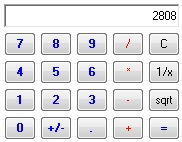
The Calc object supports the following properties and methods:
| | Name | Description | |
| | Appearance | Retrieves or sets the control's appearance. | |
| | AttachTemplate | Attaches a script to the current object, including the events, from a string, file, a safe array of bytes. | |
| | BackColor | Specifies the control's background color. | |
| | BeginUpdate | Maintains performance when items are added to the control one at a time. This method prevents the control from painting until the EndUpdate method is called. | |
| | ButtonFromPoint | Retrieves the button from the point. | |
| | ButtonHeight | Specifies the height of the control's buttons. | |
| | Buttons | Specifies the list of buttons in the control. | |
| | ButtonWidth | Specifies the width of the control's buttons. | |
| | CalcHeight | Gets the height in pixels of the painted area. | |
| | CalcWidth | Gets the width in pixels of the painted area. | |
| | Caption | Specifies the control's caption. | |
| | Copy | Copies the control's content to the clipboard. | |
| | DecimalSymbol | Specifies the current decimal symbol. | |
| | EditBackColor | Specifies the control's edit background color. | |
| | EditForeColor | Specifies the control's edit foreground color. | |
| | EditHeight | Specifies the height of the control's edit portion. | |
| | Enabled | Enables or disables the control. | |
| | EndUpdate | Resumes painting the control after painting is suspended by the BeginUpdate method. | |
| | EventParam | Retrieves or sets a value that indicates the current's event parameter. | |
| | Execute | Executes a command. | |
| | ExecuteTemplate | Executes a template and returns the result. | |
| | Font | Retrieves or sets the control's font. | |
| | ForeColor | Specifies the control's foreground color. | |
| | HTMLPicture | Adds or replaces a picture in HTML captions. | |
| | hWnd | Retrieves the control's window handle. | |
| | Images | Sets at runtime the control's image list. The Handle should be a handle to an Images List Control. | |
| | ImageSize | Retrieves or sets the size of icons the control displays.. | |
| | Message | Retrieves or sets a value that indicates the control's message. | |
| | Paste | Inserts data from the clipboard. | |
| | Picture | Retrieves or sets a graphic to be displayed in the control. | |
| | PictureDisplay | Retrieves or sets a value that indicates the way how the graphic is displayed on the control's background | |
| | PictureDown | Specifies the picture that's displayed when the button is down. | |
| | PictureUp | Specifies the picture that's displayed when the button is up. | |
| | Refresh | Refreshes the control. | |
| | ReplaceIcon | Adds a new icon, replaces an icon or clears the control's image list. | |
| | Reset | Resets the control | |
| | ShowImageList | Specifies whether the control's image list window is visible or hidden. | |
| | Template | Specifies the control's template. | |
| | TemplateDef | Defines inside variables for the next Template/ExecuteTemplate call. | |
| | TemplatePut | Defines inside variables for the next Template/ExecuteTemplate call. | |
| | ToolTipDelay | Specifies the time in ms that passes before the ToolTip appears. | |
| | ToolTipPopDelay | Specifies the period in ms of time the ToolTip remains visible if the mouse pointer is stationary within a control. | |
| | Version | Retrieves the control's version. | |

